
Google Calendar vs. a real deadline tracker: why due-date lists don't work for students
Aug 21, 2026 · 6 min read
Your calendar knows what is due. It doesn't know what matters.
You open Google Calendar on Monday and see five assignments.
Quiz — Tuesday.
Lab report — Wednesday.
Essay — Thursday.
Presentation — Friday.
Final project — next week.
Great. Everything is organized.
Except the final project is worth 40% of your grade, and the quiz is worth 3%.
Your calendar doesn't know that.
That's the problem with using a due-date list as your entire academic planning system. A deadline tells you when something needs to happen. It doesn't tell you how much the outcome matters.
For students, those are two very different pieces of information.
Google Calendar is good at time. That's not the whole problem.
Google Calendar does one job extremely well: showing your commitments in time.
You can see:
What is due today
What is happening tomorrow
Which days are crowded
When you have classes, exams, or appointments
Where you have available study time
That's useful.
If your problem is “I keep forgetting when things are due,” a calendar might solve it completely.
But student workloads have another problem:
Everything arrives labeled “due.”
A calendar treats a 2% quiz and a 40% final project as events occupying space on the same timeline.
Your grade does not.
Consider this week
Assignment | Deadline | Grade weight |
|---|---|---|
Reading quiz | Tuesday | 3% |
Lab report | Wednesday | 10% |
Essay | Thursday | 20% |
Final project | Next Friday | 40% |
If you simply follow the calendar, you naturally work from Tuesday toward Friday.
That's reasonable.
But it can produce a strange result: you spend your best study hours finishing tiny assignments while the 40% project receives whatever scraps of time remain.
The calendar isn't broken.
You're asking it to answer a question it wasn't designed to answer.
A deadline and a priority are not the same thing
This distinction sounds obvious until you're staring at 14 assignments.
Deadline: When is it due?
Priority: What deserves my attention?
They're related, but they're not interchangeable.
A 3% quiz due tomorrow is highly urgent.
A 40% project due next week is highly important.
A 40% project due tomorrow is both.
That third category is where things get ugly.
The real danger is the important-but-not-yet-urgent assignment. It doesn't feel like a problem because the deadline is still several days away.
So you work on whatever is shouting the loudest.
Then, suddenly, the 40% project is shouting too.
At 1:13 AM.
Why due-date lists create false priorities
A normal deadline list tends to produce a predictable behavior:
Do the next thing.
That's not always the same as:
Do the most valuable thing.
Imagine you have four hours to study tonight.
Your list says:
Quiz — due tomorrow
Discussion post — due tomorrow
Essay — due Friday
Final project — due next week
You might spend the first three hours clearing the first two items and polishing the essay.
Congratulations.
You have been extremely efficient at avoiding the 40% project.
This is one of the stranger traps of productivity systems: being organized can make it easier to work on the wrong things efficiently.
What a real deadline tracker should add
A student-focused deadline tracker should give you more than a chronological list.
At minimum, it should help you see:
1. When something is due
The basic deadline.
2. How much it's worth
The percentage of your final grade.
3. How much work remains
A two-hour assignment and a twelve-hour assignment shouldn't look identical.
4. What deserves attention first
This is the part most basic calendars leave to you.
The useful question isn't just:
“What's due next?”
It's:
“Given what is due, what is worth working on next?”
That distinction is the whole game.
Grade weight gives your deadline list context
Let's take the same four assignments and add one column:
Assignment | Due | Weight | Priority |
Quiz | Tomorrow | 3% | Quick win |
Discussion post | Tomorrow | 5% | Quick win |
Essay | Friday | 20% | High |
Final project | Next Friday | 40% | Start now |
Now the workload looks different.
You still need to finish the quiz.
You still need to submit the discussion post.
But you also know that the final project shouldn't wait until everything else is finished.
A sensible evening might look like:
45 min — finish quiz and discussion post
90 min — work on final project
45 min — essay research
The deadlines haven't changed.
Your priorities have.
This doesn't mean ignoring the nearest deadline
Grade weight isn't an excuse to ignore anything due tomorrow.
If you have a 2% quiz due at midnight, finish the quiz.
The point is to avoid letting deadline proximity become the only factor.
Think of it as two dimensions:
Urgency → How soon is it due?
Impact → How much does it affect my grade?
The highest priorities usually sit where those two overlap.
But assignments with high impact and a later deadline still deserve early attention.
That's how you prevent them from becoming emergencies.
Google Calendar and a deadline tracker can work together
This isn't necessarily a choice between using Google Calendar and using a deadline tracker.
They solve different problems.
Use your calendar for:
Classes
Appointments
Study blocks
Exam times
Actual time commitments
Use a deadline tracker for:
Assignment deadlines
Grade weights
Course workload
Priority
Progress
Then connect the two mentally.
Your calendar answers:
“When can I work?”
Your deadline tracker answers:
“What should I work on?”
That's a much better division of labor than asking one calendar to do everything.
The student planning test
Here's a simple way to find out whether your current system is actually working.
Open your calendar.
Look at your next ten assignments.
Now hide the course names and titles mentally. Look only at the dates.
Can you tell which assignment could have the biggest effect on your final grade?
If not, your system is showing you when to act without showing you why one task matters more than another.
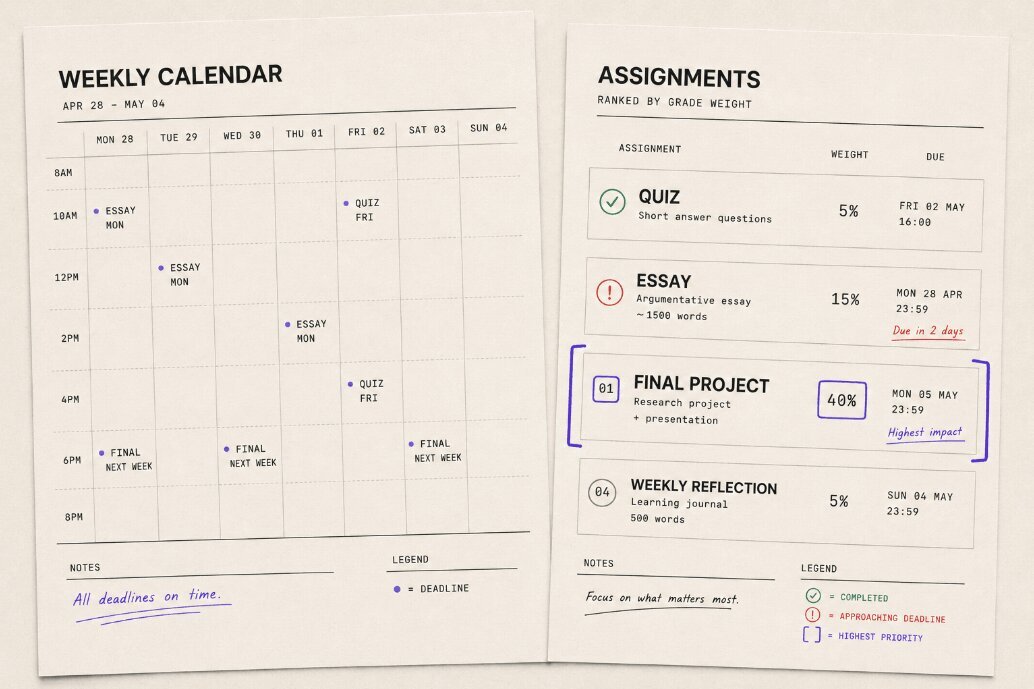
That's exactly the gap Deadliner is designed around: it ranks assignments by grade weight rather than treating every deadline as equally important.
Try this today
Don't migrate your entire semester into another app.
Take your next ten assignments and add one number beside each deadline:
the percentage of your final grade it's worth.
Then mark three categories:
High weight + soon: deal with these first.
High weight + later: start these before they become urgent.
Low weight + soon: finish them efficiently.
Now look at your calendar again.
It should still tell you what's happening and when.
But you'll have something your calendar couldn't provide on its own:
context.
Because the assignment due tomorrow isn't necessarily the assignment that deserves your entire evening.
And the one due next week isn't necessarily allowed to disappear just because it's next week.
Deadliner ranks your assignments by what they're actually worth. Try it for free